Rosecut

Ads for any business

Tell Ruby what you’re selling. Get on-brand ads back.

Ruby is Rosecut’s AI designer. Tell her what you’re selling, and she makes the ads, with your photos, your colors and your logo. Pick the one you like, and she makes it in every size, in English and Spanish.

Rosecut is in private testing, by invitation only, starting with real estate. Restaurants, shops, car dealers and home services are next.

Watch Ruby make a grand opening ad, start to finish. 1:18.

Four steps. Ruby does the work.

You tell her what you’re selling and pick what you like. She does everything else.

1Brainstorm

Talk to her like you’d talk to a customer.

Say it out loud or type it. Ruby picks out what belongs in the ad, like the price, the address and the date. If two things don’t match, she asks before anything goes in an ad.

Then a few quick questions to make the ad better. Skip any you like.
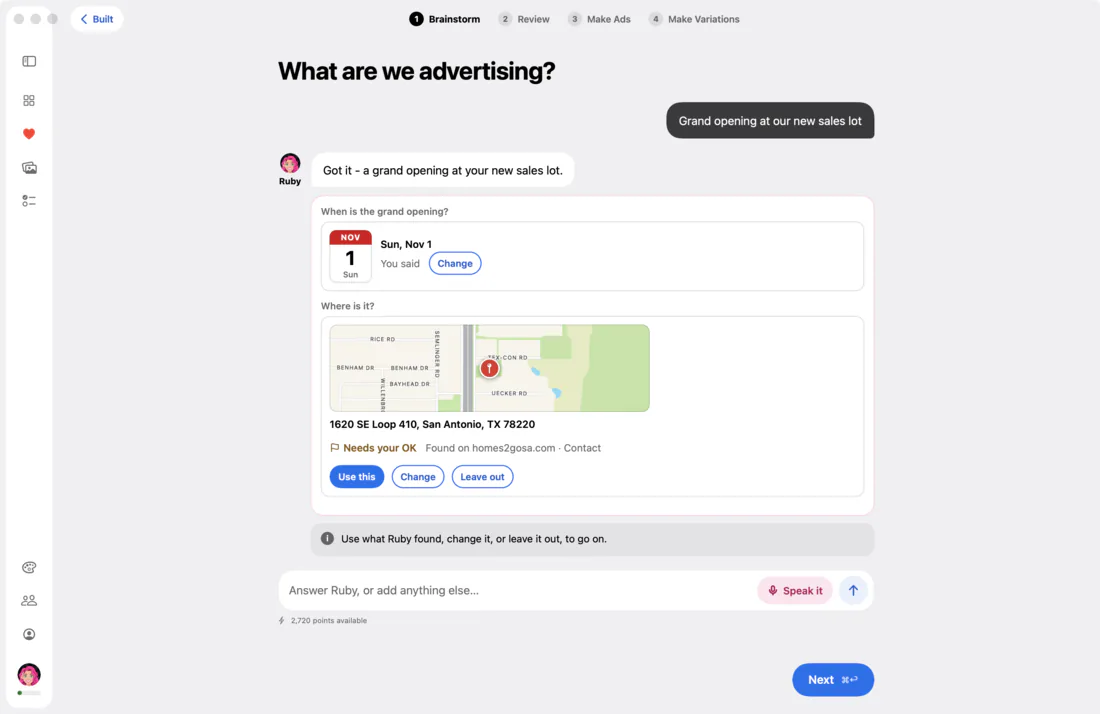
Rosecut on a Mac, step 1, Brainstorm: “Grand opening at our new sales lot.” Ruby asks when and where. The day you said, Sun, Nov 1, is on a calendar page; the address she found on homes2gosa.com, 1620 SE Loop 410 in San Antonio, is on a map with a pin, and waits for your OK.

2Review

She finds the best photo for the ad, or makes one for you.

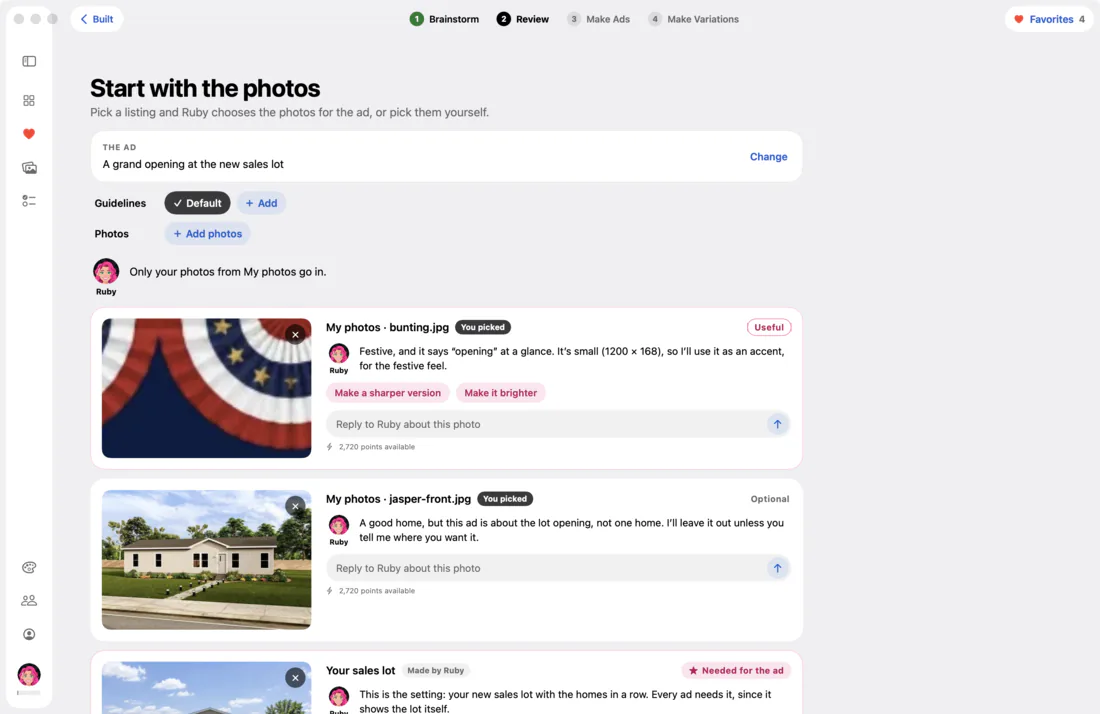
Give her your photos, and she picks the ones that will sell it, and tells you why.

Want one of your photos brighter or sharper? Just ask. You can always go back to the original.

Step 2, Review, for a grand opening at a new sales lot. Each photo has a card: a bunting photo marked Useful, with Ruby’s note that it says “opening” at a glance; a home marked Optional; and the sales lot, marked Needed for the ad.

3Make Ads

Pick your favorite. Then just say what to change.

Ruby makes several ads at once, each with its own look, so you’re choosing instead of starting from scratch. Heart the ones you like.

Want one calmer, bolder or with different words? Tell her, and she makes a new version.

  • “Grand Opening” over the sales lot, with “Our doors are open in San Antonio, TX” and “Come visit the lot”, under a row of bunting.

    #1

  • “We’re Open!” in bold yellow over the sales lot, with “Stop by and look around”. Hearted.

    #2

  • “Now Open in San Antonio, TX” on a yellow diagonal under the sales lot, with “Visit us”, under a row of bunting.

    #3

  • “Our Doors Are Open” on a navy band above the sales lot, with “Come see the lot”. Hearted.

    #4

Make it calmer, and let the lot show.

I’ll calm down the design and give the lot more room to show.

Make it light: a white background instead of the navy, and keep the gold and the logo.

I’ll switch the navy background to white and keep the gold and the logo.

Before: a big yellow “We’re Open!” on navy, over a blurred, darkened sales lot. After, two changes later: the same ad on white instead of navy, with a smaller gold headline and the sales lot sharp and in full.
Ads for Homes 2 Go, in San Antonio.

4Make Variations

One ad, every size you need. In Spanish too.

When you like an ad, Ruby lays it out again for the feed and for Stories, so it fits each one without stretching. Then the same ad in Spanish. Download them all at once.

  • The square: “We’re Open!” under the sales lot.

    SquareFeed

  • The tall one for the feed, laid out again, with more sky above the lot.

    TallFeed

  • The full-screen one for Stories: the logo and “We’re Open!” in the sky, the sales lot at the foot.

    Full screenStories

  • The full-screen ad in English: “We’re Open!”

    English

  • The same ad in Spanish: “¡Ya Abrimos!”

    Spanish

Assets

All your photos, ready for any ad

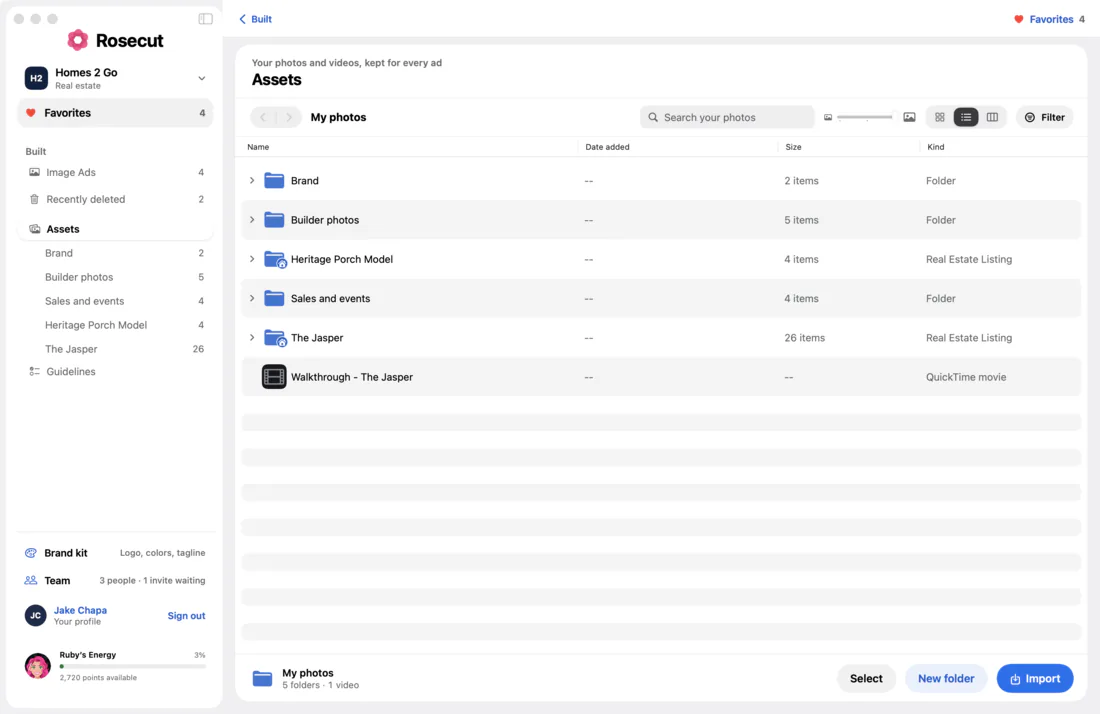
Bring them in from your computer, Dropbox or Google Drive, and keep them in folders.

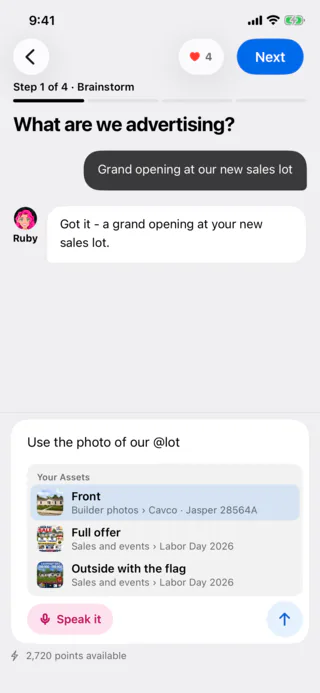
Want a certain photo, or an ad you made before? Type @ and its name, and Ruby uses it.

Assets on a Mac: folders for Brand, Builder photos and Sales and events, and two folders marked as Real Estate Listings, the Heritage Porch Model and the Jasper.
On an iPhone: “Use the photo of our @lot”, and under it the matching photos from Assets to choose from.

Brand kit

Every ad looks like your business

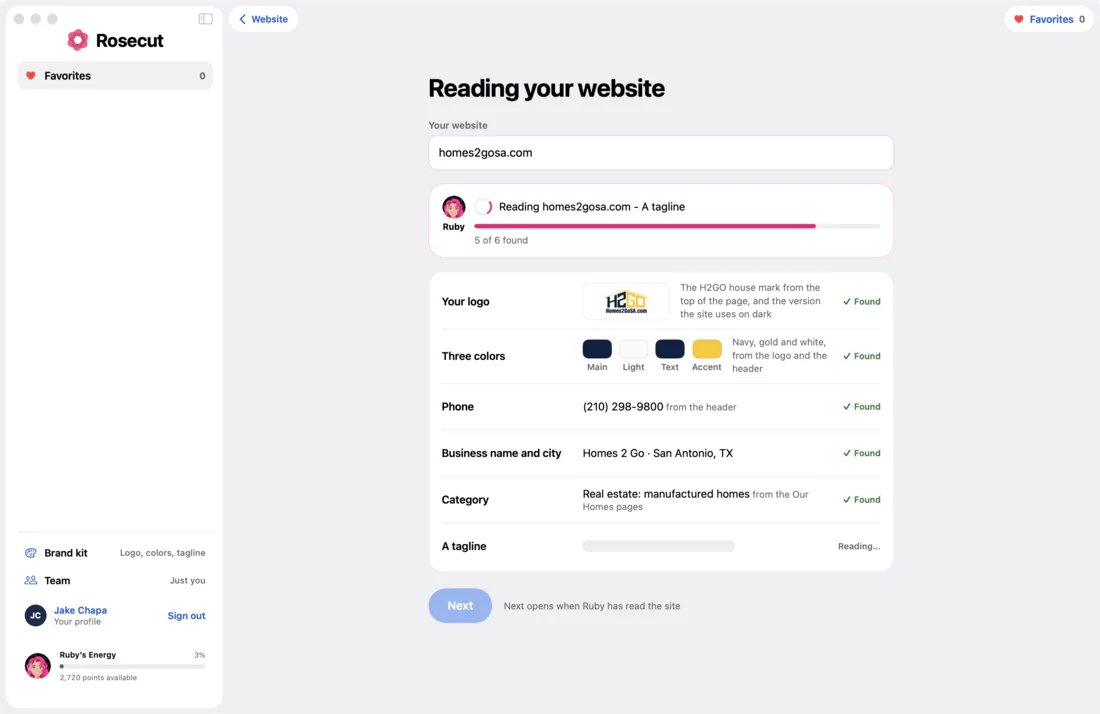
Give Ruby your website once. She finds your logo, colors, phone number and tagline, and puts them on every ad.

Ruby reading homes2gosa.com: she has found the logo, three colors (navy, gold and white), the phone number, the business name and city, and the category, and is still reading for a tagline.

Team

Bring your whole team

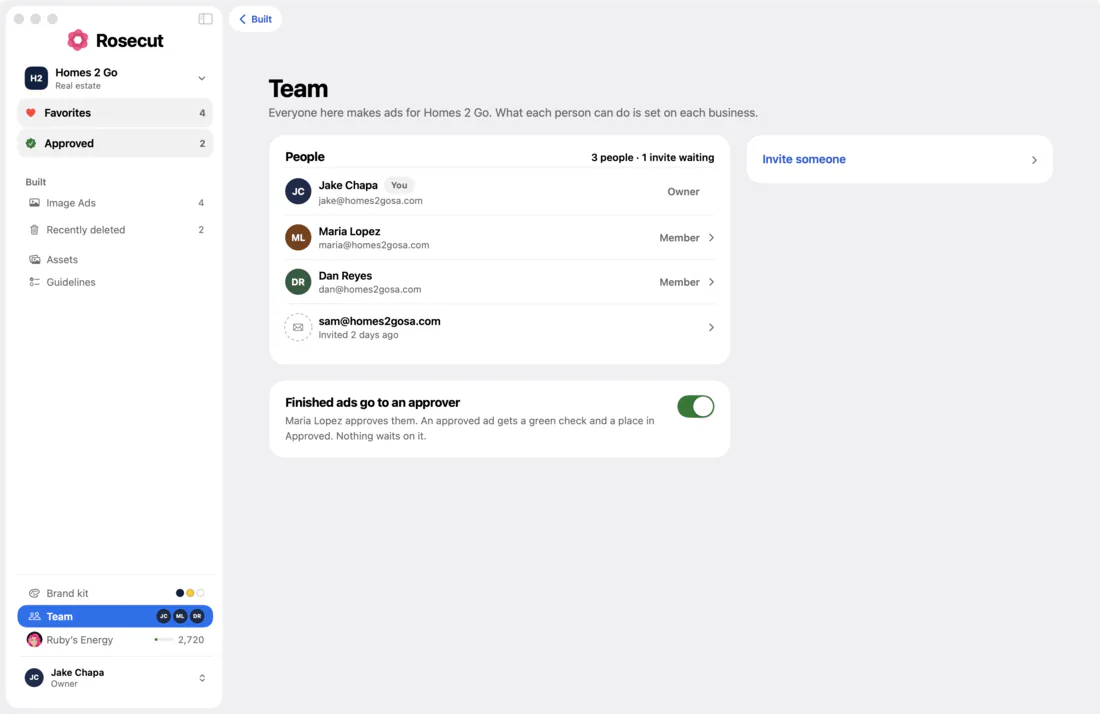
Everyone works from the same ads, photos and brand. Want someone to approve every ad? Turn on sign-off: each ad they approve gets a green check and a place in Approved, and nobody waits on it to download.

Team on a Mac: three people, the Owner and two members, one invite waiting, Approved in the sidebar, and the switch “Finished ads go to an approver” turned on.

Every device

Start at your desk. Finish anywhere.

Rosecut works on Mac, iPhone and iPad, with the same ads, photos and drafts on all of them.

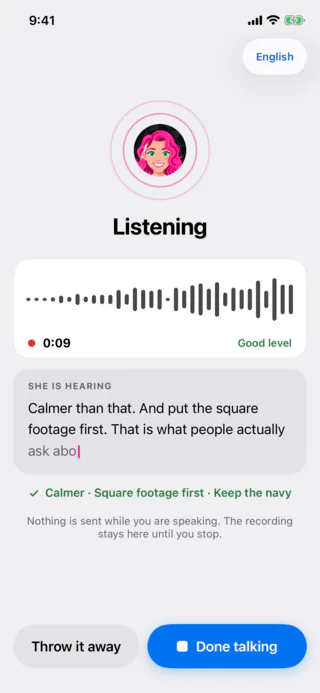
  • Ruby listening while you speak, with what she is hearing written out as you go.

    Just talk Ruby listens, and writes down what you said.

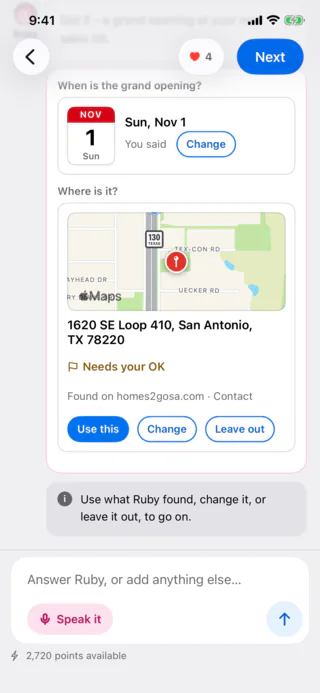
  • Brainstorm on an iPhone: the grand opening’s day on a calendar page, and the address Ruby found on a map with a pin, waiting for your OK.

    Check the details What she heard, and what she needs to ask.

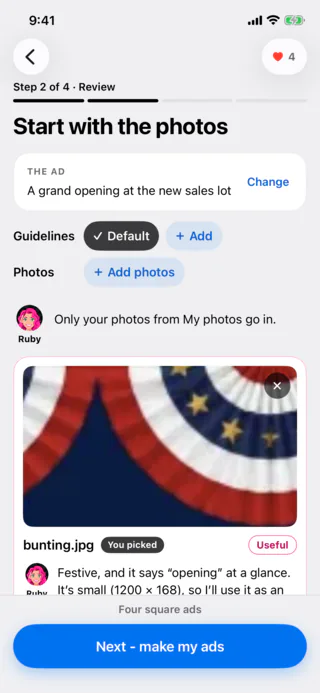
  • Review on an iPhone: the bunting photo’s card, with Ruby’s note on what it brings to the ad.

    Pick the photos Her picks, and why, wherever you are.

Your ads, your call

Rosecut never posts anything for you and never touches your ad account. It makes the ads, and you put them wherever you like.

Coming to Mac and iPhone

Rosecut is in private testing, by invitation only.

Testing it already? Sign in inside the app